
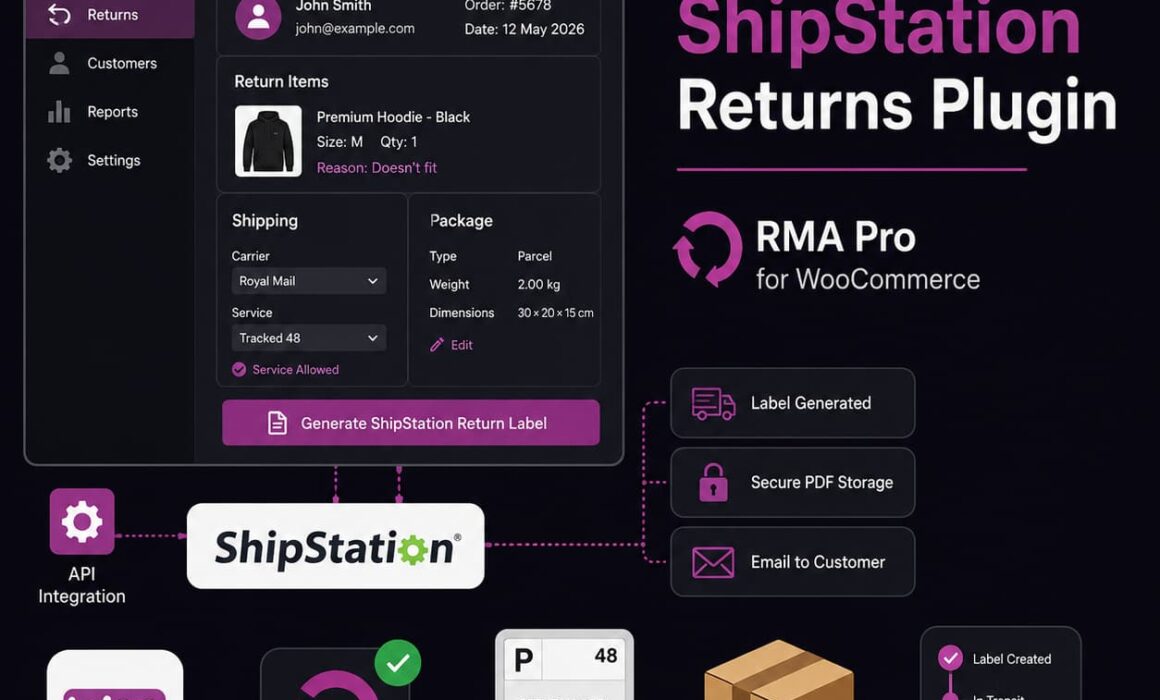
WooCommerce ShipStation Returns Plugin
A WooCommerce ShipStation returns plugin should do more than create a shipping label. It should connect the customer’s return request, your eligibility rules, the approval decision, parcel details, label delivery and tracking activity within one manageable workflow.
Without that connection, support staff approve the return in WooCommerce, recreate the shipment in ShipStation, copy customer address details, download the PDF, write another email and then return to the RMA record to document what happened. RMA Pro removes much of that manual work by bringing ShipStation return-label generation directly into the WooCommerce returns process.
What is a WooCommerce ShipStation returns plugin?
A WooCommerce ShipStation returns plugin connects your WooCommerce return-management workflow to your ShipStation account. Instead of treating the return request and its shipping label as separate tasks, the integration allows the label to be generated from the RMA record.
RMA Pro for WooCommerce supports ShipStation as a return-label provider alongside its existing Shippo integration. Merchants can connect their ShipStation API credentials, retrieve the available carriers and services, configure how labels should be generated and then create merchant-funded return labels without leaving the WooCommerce RMA workflow.
The practical objective is straightforward: keep the return request, approval decision, shipping label and customer communication connected.
Operational benefit: support staff can manage the customer’s return and generate its ShipStation label from the same RMA record instead of rebuilding the shipment manually in another platform.
This makes RMA Pro for WooCommerce useful for merchants who already use ShipStation for outbound shipping and want the same carrier infrastructure to support their returns process.
Why WooCommerce returns and ShipStation often become disconnected
WooCommerce records the order. Your returns plugin records the customer’s request. ShipStation handles the shipment. Your email system delivers the label. Your support team is responsible for keeping all of those systems aligned.
That separation creates repetitive work. A typical manual return-label process may require an administrator to:
- Open the customer’s return request.
- Confirm that the order and product are eligible.
- Decide whether the merchant should fund the label.
- Open ShipStation in another browser tab.
- Copy the customer’s name and address.
- Enter the merchant’s returns address.
- Select a carrier, service and package type.
- Enter the parcel weight and dimensions.
- Generate and download the return label.
- Create an email and attach the PDF.
- Return to WooCommerce and update the RMA notes.
- Record the provider and tracking information.
Each task is relatively small. Combined across dozens or hundreds of returns, they consume a significant amount of staff time.
The fragmented workflow also creates more opportunities for errors. Staff may mistype the postcode, select the wrong return warehouse, use an unnecessarily expensive service or forget to update the RMA after sending the label.
How the WooCommerce ShipStation returns plugin works in RMA Pro
RMA Pro connects to ShipStation through its API. Once the credentials are saved and the connection has been tested, the plugin can retrieve information from the merchant’s ShipStation account and use it when generating return labels.
The integration includes:
- ShipStation API credential storage.
- API connection testing.
- Carrier discovery.
- Shipping-service discovery.
- Package-type discovery.
- ShipStation-specific integration settings.
- Manual return-label generation.
- Automatic approval-generated labels.
- Secure PDF storage.
- Customer email delivery.
- Secure customer label links.
- Tracking updates through supported ShipStation webhooks.
- Provider-aware historical RMA records.
The available options still depend on the merchant’s ShipStation account. RMA Pro can only use the carriers, services, package types, countries and permissions exposed through that account.
Direct ShipStation API connection from WooCommerce
The integration starts with a direct API connection between RMA Pro and ShipStation.
Administrators enter their ShipStation API credentials into the RMA Pro return-label settings. The plugin can then test the connection before the merchant enables it for live return-label generation.
Why connection testing matters
API credentials can fail for several reasons. They may have been entered incorrectly, replaced, revoked or restricted. A connection test gives the merchant an opportunity to identify a setup issue before an administrator attempts to generate a customer’s label.
This is particularly important when automatic label generation is enabled. The merchant should confirm that the integration can authenticate correctly before relying on it during the approval workflow.
Saved provider-specific settings
ShipStation configuration is stored separately from the existing Shippo settings. This allows merchants to configure both integrations without overwriting one provider when they select the other.
That separation is useful for testing, migration and contingency planning. A store can set up ShipStation, review the discovered services and test its labels while retaining the existing Shippo configuration.
Carrier, service and package discovery
A WooCommerce ShipStation returns plugin needs to understand which shipping options are actually available to the merchant. RMA Pro retrieves relevant carrier, service and package information from the connected ShipStation account.
Carrier discovery
RMA Pro can retrieve carriers made available through ShipStation. These may include services supplied through ShipStation and carrier accounts connected by the merchant.
This allows businesses to continue using existing shipping arrangements where those carriers are accessible through the connected account.
Service discovery
Each carrier may provide several delivery services. The integration retrieves those services so the merchant can choose which ones RMA Pro is allowed to use for return labels.
This control is important because the most expensive or fastest service is rarely required for a standard return. Restricting the permitted services can help prevent inconsistent carrier selection and unnecessary return-shipping costs.
Package-type discovery
Package types exposed through the connected carrier accounts can also be discovered and saved.
The merchant can then select an appropriate package type instead of relying on a generic parcel configuration that may not match the carrier’s requirements.
Carrier availability: the integration does not guarantee that every ShipStation carrier, service or negotiated contract will work. Availability depends on the merchant’s connected accounts, permissions, countries and the services exposed through ShipStation.
Merchants can review ShipStation’s own technical information through its official return-label documentation.
Use your existing ShipStation carrier arrangements
Businesses that already use ShipStation may have connected carrier accounts, preferred services and established shipping processes. Adopting a completely separate platform only for return labels would add another account and another set of carrier settings to manage.
RMA Pro allows merchants to use ShipStation as the active return-label provider where their required carriers and services are exposed through the account.
This can help merchants retain:
- Their connected carrier accounts.
- Their available ShipStation services.
- Their existing carrier arrangements.
- Their established package options.
- Their ShipStation tracking infrastructure.
The integration does not replace ShipStation. It connects ShipStation’s label services to the RMA workflow so staff do not have to recreate the return manually.
Manual ShipStation return-label generation
Administrators can generate a merchant-funded ShipStation return label directly from an RMA record.
When ShipStation is the active provider, the relevant RMA controls and wording reflect that selection. Staff may see an action such as:
Generate ShipStation Return Label
Manual generation remains important even where automation is available because not every return should receive a label immediately.
The customer originally chose to return the item themselves
A customer may initially select an option such as “I’ll return myself”. After reviewing the request, support may decide to provide a merchant-funded label as a customer-service exception.
The administrator can generate that label from the RMA without manually creating the shipment in ShipStation.
The return was approved without automatic generation
Some return rules may require staff to review the circumstances before funding a label. Once the decision has been made, the label can be generated manually from the record.
The customer needs the label again
The customer may lose the original email, delete the attachment or experience a problem accessing the secure link. Staff can return to the RMA and use the appropriate regeneration workflow.
An exception needs to be handled
A damaged item, fulfilment mistake, VIP customer or carrier issue may justify a label even when the normal workflow would not automatically provide one.
Manual generation gives staff flexibility while keeping the exception documented inside the RMA.
Automatic ShipStation return labels after approval
RMA Pro can also generate ShipStation return labels automatically as part of the approval process.
Depending on the merchant’s return rules and label configuration, the workflow can:
- Approve the return request.
- Generate the ShipStation return label.
- Store the PDF through RMA Pro’s protected label system.
- Email the label to the customer.
- Record the label details against the RMA.
This significantly reduces the number of manual steps between approving the return and giving the customer what they need to send the parcel back.
| Manual return-label workflow | RMA Pro and ShipStation workflow |
|---|---|
| Approve the request in WooCommerce. | Approve the request from the RMA record. |
| Open ShipStation separately. | RMA Pro sends the configured request to ShipStation. |
| Copy the customer’s address manually. | Existing customer data is used to build the shipment. |
| Select the service and enter parcel information. | Configured service and package settings guide generation. |
| Download the PDF manually. | The label is stored through the protected RMA Pro system. |
| Write an email and attach the label. | The return-label email can deliver the PDF automatically. |
| Update the RMA manually. | The label and provider remain connected to the RMA record. |
For stores processing a high number of RMAs, removing these repeated actions can make the approval-to-label workflow considerably faster.
RMA Pro’s WooCommerce returns workflow combines this label automation with return rules, exchanges, refunds and store credit rather than treating shipping as an isolated task.
Secure label storage and customer delivery
A return-label PDF can contain the customer’s name, address, tracking information and the merchant’s return destination. It should not be treated like a normal public media file.
Labels generated through the ShipStation integration use RMA Pro’s existing protected label system.
The resulting PDF can be:
- Attached to the return-label email.
- Accessed through a secure customer label link.
- Viewed from the RMA record by authorised administrators.
This keeps the label tied to the individual return request. Staff can identify which RMA it belongs to, which provider created it and whether the customer has already been sent the relevant information.
It also makes recovery easier. If the customer cannot find the original email, the administrator can access the RMA rather than searching a download folder or recreating the shipment without context.
ShipStation tracking updates inside the RMA workflow
The WooCommerce ShipStation returns plugin includes support for tracking updates through ShipStation webhooks.
Where the selected carrier and ShipStation account support the relevant events, tracking activity can feed back into the RMA workflow.
This can provide:
- Better visibility for customer-service staff.
- Less need to check a separate shipping portal.
- Clearer information about return progress.
- More complete RMA activity records.
- Better context before a refund or exchange is completed.
Tracking availability is not identical across every carrier. The timing and detail of events depend on ShipStation, the selected service, the connected carrier account and the tracking information supplied by the carrier.
The integration should therefore be viewed as a way to bring supported tracking activity into the RMA, not as a guarantee of immediate tracking events for every return.
Control which ShipStation services RMA Pro can use
Connecting ShipStation does not mean every available service should be used automatically. Return shipping is a cost, and stores need control over how labels are created.
RMA Pro provides several ShipStation-specific controls.
Allowed shipping services
Administrators can restrict label generation to approved services. This helps prevent staff or automated workflows from using premium options that are not suitable for normal returns.
Default parcel dimensions
Default length, width and height values can be configured for the normal return parcel.
This is useful where most products are returned in a predictable package size. It also removes repeated dimension entry from the standard workflow.
Default parcel weight
A default weight can be configured for ordinary returns. Merchants should use a realistic value and apply overrides where product weights vary significantly.
Package-type selection
The merchant can choose from the package types made available through the connected ShipStation account and carrier services.
Regional preferred services
Different delivery regions may require different return services. A preferred domestic service may not be available or appropriate for another country.
Regional preferences allow the return-label configuration to reflect those differences.
Heavy-parcel overrides
The standard service may not support heavier returns. RMA Pro can use a configured override where the parcel meets the relevant weight conditions.
Return-address configuration
The merchant can define the destination used for return shipments. This may be a warehouse, office, fulfilment centre or dedicated returns location.
Keeping the address inside the integration reduces the risk of staff selecting an old or incorrect destination.
Reduce return-address entry errors
Manual copying is one of the least valuable parts of return administration. It is also one of the easiest places to make a mistake.
Common address and parcel errors include:
- Misspelt customer names.
- Missing flat or unit numbers.
- Incorrect postcodes.
- Street information placed in the wrong field.
- The wrong country selected.
- An outdated merchant returns address.
- Incorrect package dimensions.
- An unrealistic parcel weight.
RMA Pro builds the return shipment using customer information and configured merchant data associated with the request.
The quality of the label still depends on the accuracy of that source data, but staff no longer have to retype every field into ShipStation for each return.
Switch between Shippo and ShipStation
RMA Pro supports both Shippo and ShipStation as return-label providers.
Merchants can configure both integrations and select which one is currently active for new supported labels.
The current workflow uses one active provider at a time. This avoids inconsistent label behaviour and makes it clear which integration the store is using.
Provider credentials remain saved
Choosing ShipStation does not remove the saved Shippo credentials. Choosing Shippo does not remove the saved ShipStation credentials.
A merchant can therefore:
- Configure ShipStation without deleting Shippo.
- Test the ShipStation connection before switching.
- Retain the previous provider as a fallback.
- Switch back without entering all settings again.
No simultaneous provider rating
RMA Pro does not currently request rates from both Shippo and ShipStation for the same return and choose between them.
The selected active provider handles the relevant new label workflow.
No separate provider for each individual RMA
The current version also does not allow the merchant to choose a completely different active provider for every individual return request.
Using one active provider keeps the workflow predictable for administrators and automated approvals.
Historical labels remain tied to the correct provider
Changing the active provider should not rewrite the history of labels already generated.
RMA Pro records which provider was used for each label. This means:
- ShipStation labels remain associated with ShipStation.
- Shippo labels remain associated with Shippo.
- Regeneration follows the appropriate provider.
- RMA wording reflects the integration actually used.
- Switching providers does not incorrectly alter historical records.
- Older Shippo-based RMAs continue to behave correctly.
This provider-aware design is particularly important when a merchant migrates to ShipStation after previously generating labels through Shippo.
Without it, staff could see incorrect provider wording or attempt to regenerate an older label through the wrong service.
How return labels fit with refunds, exchanges and store credit
A return label handles the physical movement of the item. It does not decide the commercial outcome.
The customer may want:
- A refund.
- An exchange.
- Store credit.
- A combination of outcomes for several products.
RMA Pro keeps the return label inside the wider RMA record so the parcel remains connected to the intended resolution.
Mixed exchange and refund request
A customer returns two items in one parcel. They want to exchange one product for another size and receive a refund for the second item.
The merchant may provide one ShipStation return label, but the warehouse and admin team still need to know that the products require different outcomes.
Keeping the label, request and resolution in one RMA workflow reduces the risk of both items being treated as a refund.
Store credit instead of a refund
A customer may use a merchant-funded ShipStation label to return an item and accept store credit rather than receiving money back.
The shipping process remains the same, but the store retains the value and gives the customer a reason to purchase again.
Rules before merchant-funded labels
Not every customer should automatically receive a merchant-funded return label.
RMA Pro’s return rules help control eligibility before the store incurs the shipping cost. A late return, excluded product, high-risk customer or customer-responsible return may require a different process.
This is why an integrated WooCommerce returns and exchanges plugin is more useful than a standalone label button.
Basic WooCommerce Returns Plugins vs RMA Pro
| Area | Basic WooCommerce Returns Plugins | RMA Pro |
|---|---|---|
| Customer requests | Often provide a basic return form. | Provides a structured return portal connected to the RMA workflow. |
| ShipStation labels | Staff normally create labels manually outside WooCommerce. | Supports manual and automatic ShipStation return-label generation. |
| Label delivery | PDFs may need to be downloaded and emailed manually. | Supports protected storage, email attachments and secure customer links. |
| Carrier controls | Usually managed separately inside the shipping platform. | Supports allowed services, parcel defaults, regional preferences and heavy-parcel overrides. |
| Provider switching | Often limited to one provider or no integrated provider. | Allows Shippo and ShipStation to remain configured with one active provider. |
| Historical labels | Provider details may not remain connected to the request. | Each label remains associated with the provider that generated it. |
| Return outcomes | Often focused mainly on refund requests. | Supports refunds, exchanges, store credit and mixed return workflows. |
| Activity visibility | Staff may rely on emails and manual order notes. | Keeps label and RMA activity connected to the return record. |
Practical WooCommerce ShipStation returns plugin scenarios
Automatic label for an approved standard return
A customer submits a return request that meets the merchant’s rules for a funded label. The administrator approves it.
RMA Pro generates the ShipStation label, stores it securely, emails it to the customer and records the relevant information against the RMA.
The support employee does not need to recreate the return in ShipStation.
Manual label after reviewing a damaged product
The customer initially selected that they would arrange the return themselves. Photographs later show that the item was damaged before delivery.
Support decides to fund the return and generates the ShipStation label manually from the RMA record.
Provider migration from Shippo
A merchant currently uses Shippo but wants future merchant-funded labels to use ShipStation.
The administrator configures and tests ShipStation while retaining the saved Shippo settings. New labels use ShipStation after it becomes active, while historical Shippo labels remain associated with Shippo.
Heavy-item return
Most products use a standard parcel service, but one product exceeds its normal weight conditions.
The configured heavy-parcel override allows RMA Pro to use a more suitable permitted service.
Regional service preference
A merchant uses one return service for UK customers and another for a different shipping zone.
Regional preferred services help the label workflow apply the merchant’s established policy without asking staff to remember it for every request.
Current ShipStation support and limitations
The ShipStation integration in RMA Pro 2.8.1 covers merchant-funded return labels.
Included in the current integration
- ShipStation API connection and testing.
- Carrier discovery.
- Service discovery.
- Package-type discovery.
- Admin-generated return labels.
- Automatic approval-generated labels.
- Regenerated labels.
- Protected PDF storage.
- Customer email delivery.
- Secure customer label links.
- Tracking webhook support where available.
- Package and service configuration.
- Shippo and ShipStation provider switching.
- Provider-aware historical RMA records.
Not currently included
- Customer-paid ShipStation return labels.
- Choosing a different provider independently for each individual RMA.
- Simultaneously rating Shippo and ShipStation for the same request.
Customer-paid labels: customer-paid return labels remain available through RMA Pro’s existing Shippo workflow. Customer-paid ShipStation support is planned for a later release, but it is not part of the current ShipStation integration.
Who should use a WooCommerce ShipStation returns plugin?
The integration is particularly useful for the following types of merchant.
Stores already using ShipStation
Existing ShipStation merchants can use their connected carrier infrastructure for supported return labels rather than adding a separate label platform purely for WooCommerce returns.
Stores processing high RMA volumes
Automatic approval-generated labels can remove several repeated steps from every qualifying return.
Customer-service teams handling labels manually
Support staff can create the label from the RMA record without copying addresses between systems or composing a separate email.
Stores with regional or weight-based shipping requirements
Regional service preferences and heavy-parcel overrides provide more control than one generic return service.
Merchants moving from Shippo to ShipStation
The ability to retain both configurations reduces the risk of testing or changing providers.
Stores needing stronger RMA visibility
Protected label storage, provider-aware records and supported tracking updates provide more context within the return workflow.
What to check before choosing a WooCommerce ShipStation returns plugin
Not every plugin that mentions ShipStation provides the same level of return integration. Before choosing one, confirm how it handles the full workflow.
- Can it test the ShipStation API connection?
- Can it discover the carriers and services available to your account?
- Can staff generate labels directly from the RMA?
- Can qualifying labels be generated automatically after approval?
- Are PDFs stored securely?
- Can labels be attached to customer emails?
- Can the customer retrieve the label through a secure link?
- Does the RMA record retain the provider used?
- Can the system support service restrictions and parcel defaults?
- Can you switch providers without losing the inactive configuration?
- Does the plugin clearly state whether labels are merchant-funded or customer-paid?
- Can tracking activity feed back into the return record where supported?
A label-generation button alone does not create a complete returns workflow. The integration should reduce admin before, during and after the label is generated.
Setting up ShipStation return labels in RMA Pro
The available carriers and services depend on the individual ShipStation account, but the broad setup process is:
- Install or update to an RMA Pro version that includes ShipStation support.
- Open the return-label integration settings.
- Enter the ShipStation API credentials.
- Test the connection.
- Retrieve the available carriers, services and package types.
- Select the permitted return services.
- Configure the default parcel dimensions and weight.
- Select the appropriate package type.
- Configure regional preferred services if required.
- Configure heavy-parcel overrides where required.
- Confirm the merchant’s return address.
- Select ShipStation as the active provider.
- Test manual generation with a suitable RMA.
- Review automatic generation and customer email delivery before enabling it at scale.
Merchants should verify the generated address, service, package details and tracking behaviour using their own ShipStation account before relying on automation for all qualifying returns.
Keep ShipStation return labels inside your WooCommerce RMA workflow
A WooCommerce ShipStation returns plugin should remove work rather than add another disconnected screen to the process.
RMA Pro brings the customer request, eligibility rules, approval, label generation, secure delivery and RMA activity into one more coherent workflow. Staff can generate ShipStation return labels from WooCommerce, while the merchant retains control over the allowed services, package settings and return address.
Shippo remains available, provider settings can remain saved during migration and historical labels retain the correct provider. This gives merchants more choice without sacrificing the accuracy of existing RMA records.
The current ShipStation integration focuses on merchant-funded labels, with manual generation, automatic approval-generated labels, secure customer delivery and supported tracking updates. It is designed for stores that already use ShipStation and want to stop rebuilding approved returns manually outside WooCommerce.
Explore RMA Pro for WooCommerce to connect ShipStation return-label generation with your refunds, exchanges, store credit, rules and wider return-management workflow.
“`