
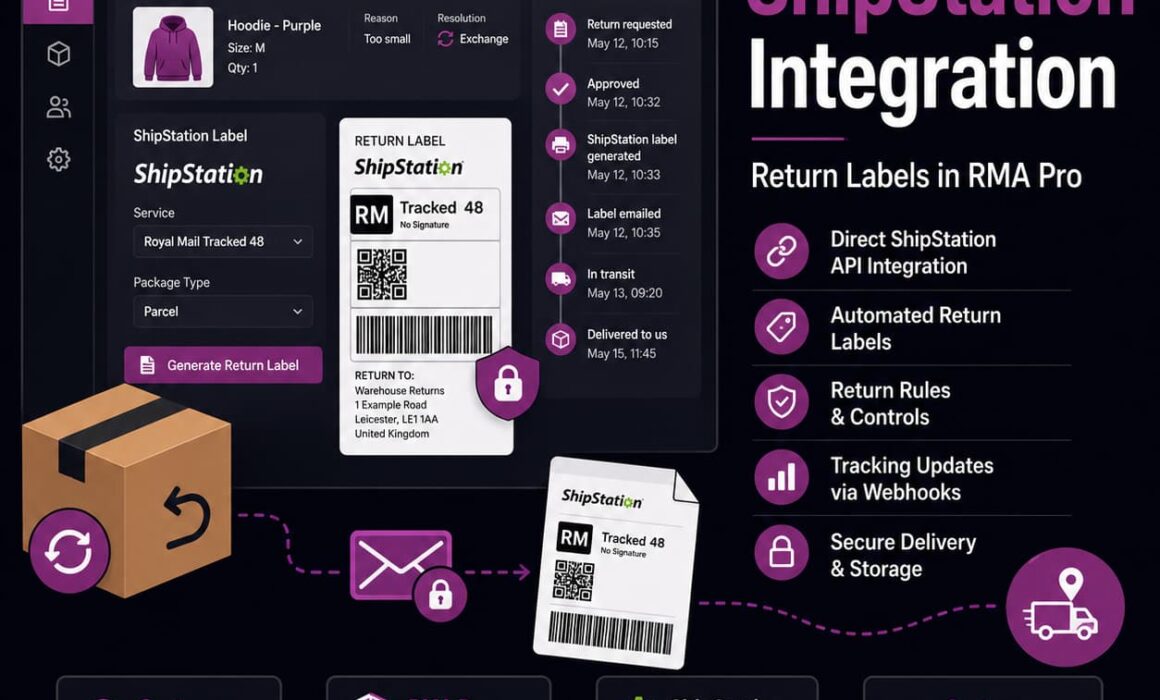
New ShipStation Integration for RMA Pro
The new ShipStation integration for RMA Pro gives WooCommerce stores another way to create and manage return labels without leaving their existing return workflow. From RMA Pro 2.8.1, merchants can connect their ShipStation account, discover the available carriers and services, and generate merchant-funded return labels directly from the WooCommerce RMA record.
This is more than adding another label provider. It closes an operational gap that normally forces support staff to move between WooCommerce, ShipStation, customer emails and internal notes whenever a return label is required. RMA Pro can now keep the approval, label generation, secure delivery and return activity connected to the same RMA request.
What the ShipStation integration for RMA Pro adds
RMA Pro already supported return-label generation through Shippo. Version 2.8.1 expands that capability by adding ShipStation as a second supported return-label provider.
Merchants can now configure both integrations and select which provider RMA Pro should currently use. Once ShipStation is active, authorised administrators can create merchant-funded ShipStation return labels from inside the RMA workflow rather than manually recreating the return shipment in a separate shipping platform.
The main change: support staff can approve a return, generate its ShipStation label, deliver the PDF securely to the customer and retain the tracking and provider information against the RMA record.
The integration includes:
- Direct connection using ShipStation API credentials.
- API connection testing from the RMA Pro settings.
- Carrier discovery from the connected ShipStation account.
- Shipping-service discovery.
- Package-type discovery.
- Saved ShipStation-specific configuration.
- Manual return-label generation from an RMA record.
- Automatic label generation during return approval.
- Secure PDF storage and customer delivery.
- Tracking support through ShipStation webhooks where available.
- Provider-aware historical label records.
- Switching between Shippo and ShipStation without deleting the inactive provider’s settings.
These features make ShipStation part of the existing RMA Pro for WooCommerce workflow rather than a disconnected tool staff must manage separately.
Why return labels are an operational problem, not just a shipping task
Creating a return label appears simple when viewed in isolation. The customer needs to send an item back, so the store creates a label and emails it to them. The operational reality is more involved.
Before creating the label, someone normally has to:
- Review the return request.
- Check whether the item is eligible.
- Confirm who should fund the return.
- Find the customer’s collection address.
- Enter or verify the merchant’s return address.
- Choose an appropriate carrier and service.
- Enter the parcel weight and dimensions.
- Create the shipment in the shipping platform.
- Download the label.
- Attach it to an email.
- Record the tracking number or label details.
- Update the customer and the wider team.
If those steps are split across WooCommerce, ShipStation, email and manual notes, every return label becomes a small admin project.
The cost is not only staff time. Retyping address data creates opportunities for errors. Separate systems make it harder to see what has happened. A label may be created without the RMA being updated. A customer may be emailed the wrong attachment. Another employee may regenerate a label because they cannot see that one already exists.
The new integration reduces these risks by using data already held within the return request and the merchant’s configured settings.
How the ShipStation integration for RMA Pro connects to your account
Administrators can connect RMA Pro to ShipStation through the plugin’s return-label settings using their ShipStation API credentials.
The connection process is designed to do more than save a credential. RMA Pro can test the API connection and retrieve the relevant shipping options exposed through the connected account.
API connection testing
Connection testing gives the administrator a way to confirm that RMA Pro can communicate with ShipStation before relying on it for live return labels.
This is important because an invalid credential, missing permission or account configuration issue should be identified during setup rather than when a member of staff is trying to approve a customer return.
Carrier discovery
Once connected, RMA Pro can discover the carriers available through the merchant’s ShipStation account.
This may include shipping services supplied through ShipStation and carrier accounts the merchant has connected inside ShipStation. It allows stores to continue using existing carrier arrangements where those carriers and services are available through the API.
Service discovery
A connected carrier may offer several shipping services. The integration retrieves the relevant services so the merchant can control which ones RMA Pro is permitted to use for return labels.
This prevents the system from simply selecting any service exposed by the account. The store can configure a more controlled return-label policy based on cost, geography, parcel type and operational preference.
Package-type discovery
Package types made available through the connected ShipStation carrier setup can also be retrieved and saved within the integration settings.
This is useful because a return parcel is not always treated as a generic package. The selected carrier may expose specific parcel, envelope or packaging options that affect how the shipment is created.
Important availability point
RMA Pro can only use the carriers, services and package types that ShipStation makes available to the connected account. Availability can vary according to the merchant’s carrier accounts, contracts, permissions, countries and ShipStation configuration.
It would therefore be inaccurate to claim that every ShipStation carrier or every negotiated carrier contract will work in every scenario. Merchants should test the required services with their own account configuration.
ShipStation also publishes official information about creating API return labels in its return-label API documentation.
Use existing ShipStation carriers and connected accounts
A major benefit for existing ShipStation users is that they do not need to adopt a completely separate carrier setup just for WooCommerce returns.
Where supported by the connected account, RMA Pro can work with:
- Shipping services provided through ShipStation.
- Carrier accounts connected by the merchant inside ShipStation.
- Services exposed by those carrier accounts.
- Package types made available to the integration.
This can be valuable for businesses that have already spent time configuring carrier accounts, negotiating rates or standardising fulfilment through ShipStation.
Without the integration, a return approved in WooCommerce may need to be recreated manually in ShipStation. The employee has to copy the customer address, select the service, enter the parcel details, download the label and return to the RMA record.
With RMA Pro 2.8.1, that workflow can remain connected to the return request.
Shippo and ShipStation provider switching
Adding ShipStation does not remove the existing Shippo integration. Merchants can configure both providers and choose which one RMA Pro should currently use for new return labels.
The current version uses one active label provider at a time. This keeps label behaviour predictable and avoids situations where different staff members unknowingly create labels through different providers for similar requests.
Saved credentials are retained
Selecting ShipStation does not delete the saved Shippo configuration. Selecting Shippo does not delete the saved ShipStation configuration.
This means a merchant can:
- Configure ShipStation while continuing to use Shippo.
- Test ShipStation before making it the active provider.
- Switch to ShipStation without losing the previous Shippo settings.
- Switch back to Shippo without re-entering every credential and preference.
This reduces the practical risk of testing or migrating between label providers.
One active provider at a time
RMA Pro 2.8.1 does not simultaneously rate Shippo and ShipStation for the same return request. It also does not select a different active provider independently for every new RMA.
The merchant chooses one provider as the active source for new return labels. That setting controls the wording, buttons and label-generation workflow shown in the relevant RMA records.
| Provider behaviour | How RMA Pro handles it |
|---|---|
| ShipStation selected | New supported labels use the configured ShipStation workflow. |
| Shippo selected | New supported labels continue through the existing Shippo workflow. |
| Inactive provider | Its saved credentials and configuration remain stored for future use. |
| Historical label | The original provider remains associated with that label and RMA record. |
| Label regeneration | RMA Pro follows the provider associated with the original label record. |
Provider-aware historical RMA records
Provider switching would become risky if changing the active setting altered older RMA records. RMA Pro avoids this by storing the provider used for each generated label.
This provider-aware design means:
- ShipStation labels remain associated with ShipStation.
- Shippo labels remain associated with Shippo.
- Regeneration follows the correct provider.
- Admin wording reflects the provider actually used.
- Changing the active provider does not rewrite historical label records.
- Older Shippo-based RMAs can continue to behave correctly after ShipStation is enabled.
This matters most during migration. A merchant may have hundreds of existing RMA records created while Shippo was active. Switching new labels to ShipStation should not make those older records appear as though their labels were generated through ShipStation.
The label provider is therefore treated as part of the RMA history, not merely a global display setting.
Manual ShipStation return-label generation
RMA Pro allows administrators to generate a ShipStation return label manually from the relevant RMA record.
The action and wording shown to the administrator automatically reflect the selected provider. When ShipStation is being used, the interface can present an action such as:
Generate ShipStation Return Label
Manual generation is useful because not every return should follow a completely automatic route.
When the customer selected “I’ll return myself”
A customer may initially indicate that they will arrange their own return. After reviewing the case, support may decide that providing a merchant-funded label would create a better outcome.
The administrator can generate the label from the RMA without rebuilding the request in ShipStation manually.
When no label was generated automatically
Some return rules or workflows may require manual approval before the store funds a label. Once the decision is made, the label can be generated directly from the record.
When a label needs to be regenerated
A PDF may be lost, the customer may be unable to access the original email, or staff may need to recreate the label after reviewing the return.
Provider-aware regeneration helps ensure the replacement label follows the correct integration.
When staff make an exception
Not every valid customer-service decision can be predicted in advance. A high-value customer, damaged product or delivery failure may justify a merchant-funded label even where the normal rule would not provide one.
Manual generation gives the team flexibility without forcing them outside the RMA workflow.
Automatic return-label generation after approval
Where the merchant’s RMA Pro rules and label settings permit it, ShipStation return labels can be generated automatically as part of the return approval workflow.
A typical automated workflow can:
- Approve the customer’s return request.
- Generate the ShipStation return label.
- Store the PDF through RMA Pro’s protected label system.
- Email the label to the customer.
- Record the label and provider details against the RMA.
This removes several manual steps between approval and label delivery.
| Manual workflow | Integrated RMA Pro workflow |
|---|---|
| Approve the return in WooCommerce. | Approve the return in the RMA record. |
| Open ShipStation separately. | RMA Pro sends the configured label request to ShipStation. |
| Copy and paste the customer address. | Existing customer and return-address data are used. |
| Enter the parcel details and choose a service. | Configured package and service preferences guide generation. |
| Download the PDF. | The PDF is stored through RMA Pro’s protected label system. |
| Create a customer email and attach the label. | The existing return-label email workflow can deliver it. |
| Return to WooCommerce and record the outcome. | Label details remain associated with the RMA record. |
For a store processing occasional returns, this saves a few minutes. For a store processing dozens or hundreds of approved RMAs, it can remove a significant amount of repetitive admin.
Secure PDF storage and customer delivery
Return labels contain customer and shipment information, so they should not be placed in an unprotected public folder with an easily guessed URL.
ShipStation labels generated through RMA Pro use the plugin’s existing protected label system. The PDF remains tied to the specific RMA rather than being treated as a generic public media file.
The label can then be:
- Attached to the return-label email sent to the customer.
- Accessed through the existing secure customer label link.
- Viewed from the RMA record by an authorised administrator.
This gives the store multiple delivery and recovery options. If the customer loses the email, staff can direct them to the secure link or access the record themselves without recreating the shipment unnecessarily.
It also keeps the label connected to the return request. The team can see which RMA it belongs to, which provider generated it and what action has already been taken.
Tracking support through ShipStation webhooks
The ShipStation integration includes support for tracking updates through webhooks.
A webhook allows ShipStation to send supported tracking activity back to the RMA Pro workflow when an event occurs, rather than requiring the plugin to repeatedly check for updates.
Where supported by ShipStation and the selected carrier, this can improve:
- Visibility for customer-service staff.
- Return progress information.
- The completeness of RMA activity records.
- The team’s ability to see movement without opening a separate shipping portal.
ShipStation’s official webhook documentation explains that webhook events can include parcel-tracking activity.
Tracking limitation: the timing and detail of tracking updates depend on ShipStation, the carrier, the connected account and the events supplied for that shipment. Stores should not assume that every carrier will provide identical or instantaneous return tracking.
The integration improves the route for tracking information to reach the RMA. It cannot create tracking events that the carrier or ShipStation does not provide.
Carrier, service and package controls
Automating return labels should not mean giving the system unrestricted access to every available shipping service.
RMA Pro provides ShipStation configuration options similar to those already used by the Shippo integration. These settings help the merchant define how return shipments should be created.
Allowed shipping services
Merchants can control which discovered services RMA Pro is allowed to use.
This is useful when an account exposes premium, timed or specialist services that would be unnecessarily expensive for ordinary customer returns.
Default parcel dimensions
Default length, width and height values can be configured for return shipments.
This reduces repetitive data entry and helps standardise labels where most returned products use a predictable parcel size.
Default parcel weight
A default weight can be supplied for the normal return workflow.
Stores should choose realistic defaults and use appropriate overrides where product or parcel weight can vary significantly.
Package-type selection
Merchants can select from package types discovered through ShipStation where those options are exposed by the connected account and carrier.
Regional preferred services
Different regions may require different preferred return services. A service suitable for domestic UK returns may not be appropriate for another country or zone.
Regional preferences allow the label policy to reflect these operational differences.
Heavy-parcel service overrides
A default return service may work well for normal parcels but not for heavy shipments. Heavy-parcel overrides allow a more suitable service to be used when the configured weight conditions require it.
Return-address configuration
The merchant’s return address can be configured for the ShipStation label workflow.
This ensures the parcel is directed to the correct warehouse, office or returns location rather than relying on staff to enter the destination manually for every RMA.
Reduced address-entry errors
Manual label creation creates a simple but frequent source of mistakes: copying customer and merchant address information between systems.
Common errors include:
- Misspelt customer names.
- Missing flat or unit numbers.
- Incorrect postcodes.
- Wrong countries.
- Old warehouse return addresses.
- Incorrect parcel measurements.
- Numbers copied into the wrong address field.
RMA Pro builds the return shipment using customer data and configured merchant return-address information already associated with the request and integration.
This does not remove the need for accurate source data, but it reduces the additional risk introduced when an employee retypes or copies the information manually.
Before the integration
A support employee approves a return, opens ShipStation, copies six address fields, selects a service, enters a parcel weight, downloads a PDF, opens the helpdesk and writes a new email.
With the integration
The employee approves the RMA or selects the manual label action. RMA Pro uses the configured data, stores the generated label securely and keeps the result connected to the return record.
Keep return processing inside WooCommerce
Context switching is one of the hidden costs of ecommerce admin. A task takes longer every time an employee has to open another platform, find the correct record and reconstruct what they were doing.
Without a direct integration, a support employee may need to move through:
- The WooCommerce order.
- The RMA record.
- The ShipStation account.
- A customer-service mailbox or helpdesk.
- An internal note or tracking spreadsheet.
RMA Pro’s ShipStation support is designed to reduce that movement. Staff can manage the return and trigger label generation from the same RMA record.
They do not need to manually:
- Copy customer addresses into ShipStation.
- Recreate the return shipment.
- Download the label from one system and upload it to another.
- Create a separate return-label email.
- Record the provider and tracking details in another tool.
This makes the return label part of the wider WooCommerce return management system, not a separate shipping task.
Faster approval-to-label workflows
The period between approving a return and delivering the label can create unnecessary customer contact.
If approval happens on Monday but the label is not created until Tuesday, the customer may send another email asking what happens next. Support then spends more time replying to a question caused by the internal delay.
Automatic label generation can shorten that gap. Once an eligible return is approved, RMA Pro can move through generation, storage and delivery with fewer manual actions.
This is particularly useful for:
- Stores with high RMA volumes.
- Teams where different people approve returns and create labels.
- Businesses processing returns across several customer-service shifts.
- Stores with standard merchant-funded return policies.
- Peak periods when return requests increase sharply.
The customer receives a clearer next step, and the support team has fewer incomplete approvals waiting for manual label work.
More consistent return-label policies
Without a controlled system, return-label decisions can vary by employee.
One member of staff may always issue a premium tracked label. Another may choose the cheapest service. Another may ask the customer to arrange the return. Someone else may send a label without recording why the store funded it.
RMA Pro combines return rules with integration settings so the merchant can apply a more consistent policy.
The store can define:
- When merchant-funded labels should be generated.
- Which services can be used.
- Which parcel defaults apply.
- Whether automatic generation is appropriate.
- When staff should use manual generation.
- How region and parcel weight affect service selection.
Consistency matters because return shipping is a cost. If staff select services unpredictably, the merchant cannot easily understand or control that cost.
Easier migration from Shippo to ShipStation
Some merchants already use RMA Pro’s Shippo integration but want to move their wider shipping operation to ShipStation. Others may want to test ShipStation without making an immediate permanent change.
Because both provider configurations can remain saved, the merchant does not have to remove Shippo before setting up ShipStation.
A controlled migration can look like this:
- Keep Shippo as the active provider.
- Add and test the ShipStation credentials.
- Review discovered carriers, services and package types.
- Configure the ShipStation return-label settings.
- Switch the active provider to ShipStation.
- Test the live workflow with suitable return requests.
- Retain the Shippo configuration in case the merchant needs to switch back.
Historical Shippo labels remain associated with Shippo throughout the change.
This reduces the migration risk because testing ShipStation does not require the merchant to erase the previous setup first.
Practical ShipStation return-label scenarios
Scenario 1: automatic label after approval
A customer submits a valid return request through the RMA Pro portal. The request meets the store’s rules for a merchant-funded return.
An administrator approves the request. RMA Pro generates the ShipStation label using the configured service and parcel settings, stores the PDF securely, emails it to the customer and records the label against the RMA.
The employee does not need to open ShipStation or create a separate email.
Scenario 2: manual exception for a damaged item
A customer originally selected “I’ll return myself”, but the support team reviews the evidence and decides the store should fund the return because the item appears faulty.
The employee opens the RMA record and uses the manual ShipStation label action. The resulting PDF remains attached to the return workflow.
Scenario 3: regenerating a historical label
A customer cannot access their original return label. The RMA was created while Shippo was active, but the merchant has since switched new labels to ShipStation.
Because the historical record remains provider-aware, the regeneration process follows the provider associated with that label rather than incorrectly treating it as a ShipStation label.
Scenario 4: regional service selection
A merchant uses one service for standard domestic returns and a different preferred service for another region.
The configured regional settings allow the RMA workflow to use the relevant permitted service without asking staff to remember the carrier policy for every request.
Scenario 5: heavy parcel override
Most returns use the merchant’s standard parcel service, but a heavier product exceeds the preferred service conditions.
The heavy-parcel override allows the store to configure a more suitable service for that scenario rather than relying on manual intervention each time.
Basic WooCommerce Returns Plugins vs RMA Pro
Adding ShipStation support also highlights the difference between a simple return-request plugin and a more complete RMA system.
| Area | Basic WooCommerce Returns Plugins | RMA Pro |
|---|---|---|
| Customer requests | Often provide a basic return form. | Provides a structured return portal tied to the RMA workflow. |
| Return labels | Frequently require labels to be created manually in another platform. | Supports integrated Shippo and ShipStation return-label workflows. |
| Provider switching | Usually tied to one basic method or no label provider. | Allows both Shippo and ShipStation to be configured with one active provider at a time. |
| Historical records | May not retain provider-specific label history. | Stores the provider used for each label and follows it during regeneration. |
| Service controls | Often limited or handled outside WooCommerce. | Supports allowed services, package settings, regional preferences and heavy-parcel overrides. |
| Customer delivery | Staff may need to download and email labels manually. | Supports protected PDF storage, email attachments and secure customer links. |
| Return outcomes | Commonly centred on basic refund requests. | Supports returns, refunds, exchanges, store credit and rule-controlled workflows. |
| Activity visibility | Limited history across the return lifecycle. | Keeps label and return activity associated with the RMA record. |
How ShipStation labels work alongside exchanges and store credit
A return label is only one part of a return-management decision. The customer may want a refund, exchange, store credit or a combination of outcomes across several products.
RMA Pro keeps the label workflow connected to the wider RMA record so the physical return does not become separated from the commercial resolution.
Mixed refund and exchange request
A customer returns two products from the same order. One item needs to be exchanged for another size, while the second item should be refunded.
The merchant may provide one return label for the parcel, but the items still require different resolutions after receipt. Keeping the label linked to the RMA gives the team context when the parcel arrives.
Store credit resolution
A customer may return an item using a merchant-funded ShipStation label but accept store credit instead of a cash refund.
The label handles the physical return. Store credit protects more of the commercial value. Both actions remain part of the same return-management process.
Rules before labels
Not every return should automatically receive a merchant-funded label. RMA Pro’s rules help control eligibility and the available return workflow before the shipping cost is incurred.
This is particularly important for high-risk customers, excluded products, late requests and cases where the customer is responsible for arranging the return.
Current scope of ShipStation support in RMA Pro 2.8.1
RMA Pro 2.8.1 focuses on merchant-funded ShipStation return labels.
In this workflow, the store generates the label through its connected ShipStation setup and provides it to the customer. The customer does not purchase the ShipStation label through the RMA Pro portal.
Included in the current release
- Direct ShipStation API connection.
- Connection testing.
- Carrier, service and package-type discovery.
- Admin-generated ShipStation return labels.
- Automatic approval-generated labels.
- Regenerated return labels.
- Secure PDF storage.
- Customer email delivery.
- Secure customer label links.
- Provider-aware RMA records.
- Allowed service and package configuration.
- Regional service preferences.
- Heavy-parcel overrides.
- Tracking webhook support.
- Switching between Shippo and ShipStation.
Not included in the current release
- Customer-paid ShipStation return labels.
- Choosing a different active provider independently for every RMA.
- Simultaneously rating Shippo and ShipStation for the same return request.
Customer-paid labels: customer-paid return labels remain available through the existing Shippo workflow. Customer-paid ShipStation labels are planned for a later RMA Pro release.
Stating this scope clearly matters. The current ShipStation integration provides merchant-funded parity for the main administrative, automatic, secure-delivery and tracking workflows, but it does not yet replace Shippo for customer-paid labels.
Who benefits from the ShipStation integration for RMA Pro
Existing ShipStation merchants
Businesses already using ShipStation can bring their return-label workflow closer to WooCommerce instead of adopting a separate provider purely for RMA labels.
Stores processing high return volumes
Automatic approval-to-label generation can remove repetitive work from each approved request. The saving becomes more meaningful as RMA volume increases.
Customer-service teams
Support staff can manage the request and label from the same RMA record, reducing the need to switch platforms and recreate customer information.
Stores with multiple return services
Allowed services, regional preferences, package settings and heavy-parcel overrides help merchants create a more controlled label policy.
Merchants considering a Shippo-to-ShipStation move
Both providers can remain configured, making it easier to test ShipStation and switch back if required.
Stores needing stronger return visibility
Provider-aware records, secure label storage and supported tracking updates give staff more context inside the RMA workflow.
Setting up the new WooCommerce ShipStation integration
The exact services available will depend on the merchant’s ShipStation account, but the practical setup process follows a clear sequence.
- Update RMA Pro to a version that includes ShipStation support.
- Open the RMA Pro return-label integration settings.
- Add the required ShipStation API credentials.
- Test the API connection.
- Allow RMA Pro to discover available carriers, services and package types.
- Select the permitted return services.
- Configure parcel dimensions, weight and package type.
- Review regional preferred services and heavy-parcel overrides.
- Confirm the merchant return address.
- Select ShipStation as the active label provider.
- Test manual label generation with a suitable RMA.
- Review the automatic generation and email workflow before wider use.
Merchants should verify the resulting label, addresses, carrier service and tracking behaviour with their own ShipStation configuration before relying on automation at scale.
A more complete WooCommerce returns workflow
The new ShipStation integration strengthens RMA Pro’s role as an operational return-management system rather than a basic customer return form.
The customer can submit a structured request. Return rules can control eligibility. Staff can approve a refund, exchange or store-credit outcome. RMA Pro can generate a merchant-funded ShipStation label, deliver it securely and keep the provider information tied to the return.
That connected workflow reduces:
- Manual address entry.
- Repeated platform switching.
- Separate label emails.
- Missing provider information.
- Unclear historical records.
- Inconsistent carrier selection.
- Delays between approval and label delivery.
It also gives merchants more choice. Shippo remains available, while ShipStation can now be configured for businesses that already use it or prefer its carrier setup.
The result is a faster and more controlled route from approved return to physical parcel movement.
Start generating ShipStation return labels from RMA Pro
Return labels should not require staff to rebuild an approved WooCommerce return inside another platform. The customer address, return decision, merchant destination, label PDF, provider and tracking context should remain connected to the RMA.
RMA Pro 2.8.1 brings that workflow to ShipStation users. Merchants can connect their account, discover available shipping options, configure permitted services and generate merchant-funded return labels either manually or automatically.
Existing Shippo configurations can remain saved, historical labels retain the correct provider, and protected PDF delivery keeps the label tied to the customer request.
For WooCommerce stores already using ShipStation, this means fewer manual steps and a more consistent approval-to-label process. For stores considering a provider change, it provides a safer route to configure and test ShipStation without discarding the existing Shippo setup.