
WooCommerce Product Personalisation: How to Sell Custom Products Without Creating Admin Chaos
WooCommerce Product Personalisation sounds simple until the orders start coming in wrong, incomplete, unclear or impossible to produce cleanly. A customer types a name, chooses a colour, expects a preview, changes their mind in the cart, and then your team has to work out exactly what needs printing, embroidering, engraving, labelling or stitching.
That is where basic product options stop being enough. Personalisation is not just a product page feature. It is a full ecommerce workflow involving customer confidence, design control, pricing, production data, support tickets, fulfilment accuracy and catalogue management.
For WooCommerce stores selling made-to-order products, the real challenge is not letting customers type something. The challenge is letting them personalise a product without creating a messy process behind the scenes.
WooCommerce Product Personalisation Is an Operational Problem First
Most stores discover the limits of personalisation after launch, not before it. At first, adding a simple custom text field feels like the obvious answer. A dog collar needs a name. A gift box needs initials. A jacket needs embroidered text. An engraved product needs a message. So the store adds a field, collects the text and sends it through with the order.
That works until the personalisation needs structure.
What happens when Line 1 needs to be large and Line 2 needs to be smaller? What happens when a customer adds emojis that cannot be embroidered cleanly? What happens when a colour name in the order is unclear? What happens when customers keep asking, “Can I see what it will look like?” before buying?
Those are not design problems. They are operational problems that affect conversion, support workload, order accuracy and production quality.
The commercial issue: every unclear personalised order costs time. It either creates a support query, a production delay, a remake risk or a customer confidence problem before checkout.
A serious WooCommerce personalisation setup needs to control what the customer can enter, show them enough of a preview to buy confidently, and pass clear, usable information to the store team.
That is the gap Regal Product Personaliser is built to close.
Why Basic WooCommerce Product Options Plugins Often Fall Short
Basic WooCommerce product options plugins are useful when the requirement is simple. A dropdown for size, a checkbox for gift wrapping, a short text field for a name – that can be enough for some stores.
But personalisation becomes harder when the customer needs to see how their text looks on the product, choose from specific fonts and colours, follow line-specific rules, or pay an additional charge for the personalised option.
The issue is not that basic options plugins are bad. It is that many of them are built around collecting choices, not managing a controlled product personalisation workflow.
| Area | Basic WooCommerce Product Options Plugins | Regal Product Personaliser |
|---|---|---|
| Customer input | Usually collects text or selected options through standard fields. | Controls custom text through design templates, text components, required rules and line-specific settings. |
| Visual preview | Often limited or unavailable, especially for text placement and styling. | Provides a live canvas preview so customers can see their custom text on the product. |
| Fonts and colours | May use plain dropdowns or simple option lists. | Uses global font management, font thumbnails, colour swatches and display ordering. |
| Design control | Usually leaves too much interpretation to the customer or the fulfilment team. | Uses templates, fixed positions, canvas sizing, text limits and inherited settings to keep designs controlled. |
| Order data | Can result in generic custom field data or unclear order notes. | Stores production-friendly line data, selected fonts, selected colours and personalisation details. |
| Scaling | Can become repetitive when many products need similar settings. | Uses Design Templates and Template Groups to reduce repetitive setup across related products. |
For a small catalogue with one personalised field, basic options may do the job. For a store selling embroidered dog collars, personalised patches, engraved gifts, labelled products or custom printed items, the workflow usually needs more control.
WooCommerce Product Personalisation Needs a Live Preview
Customers hesitate when they cannot picture the finished product. That hesitation is not always obvious in analytics. It appears as abandoned product pages, abandoned baskets, support messages and customers choosing safer non-personalised products instead.
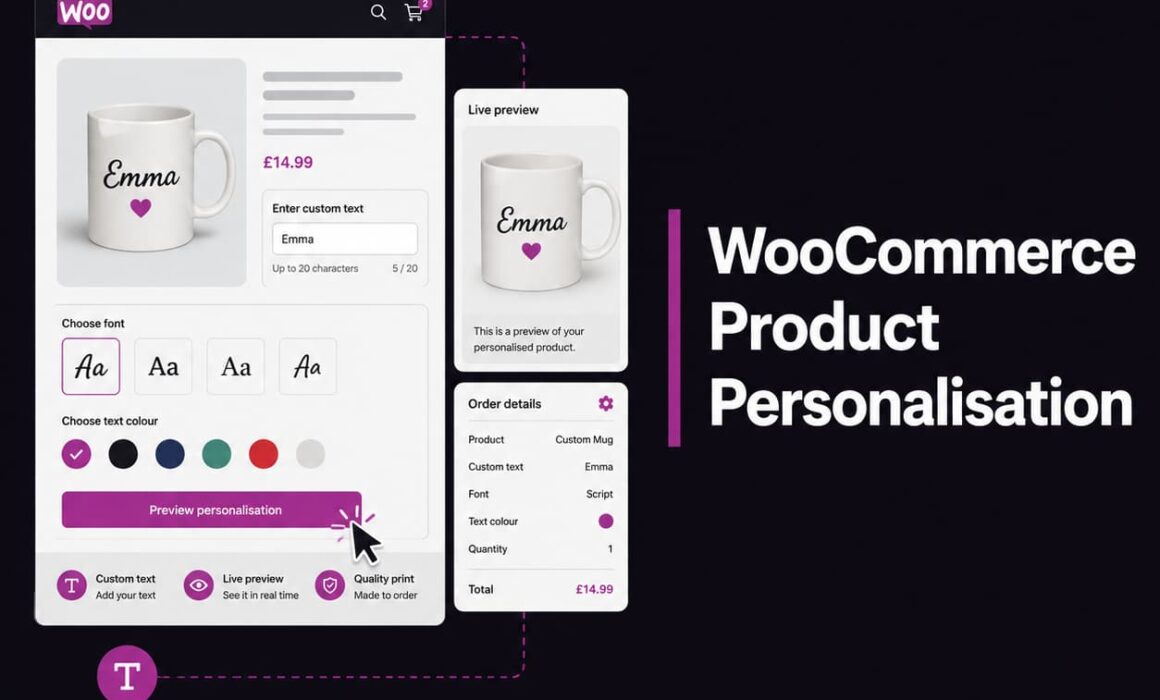
A live preview gives the customer a clearer buying decision. They can enter their custom text, change the font, choose a colour and see the result before adding the product to the cart.
This matters because personalised products usually feel riskier than standard products. Customers know they are ordering something made specifically for them. If they make a mistake, choose the wrong colour, or misunderstand how the finished item will look, they may assume it cannot be returned or easily fixed.
Without a preview
The customer types text into a field and hopes the result looks right. Support often receives “can I see it first?” messages.
With a preview
The customer sees the text on the product, checks the style, and buys with more confidence.
Regal Product Personaliser adds a customer-facing Personalise button and frontend modal designer, with a live canvas preview designed for text-based personalisation. It does not pretend to be a full artwork upload or clipart design tool. It focuses on what many serious custom product stores need most: controlled customer text, font choice, colour choice and a clearer preview before checkout.
How Design Templates Keep Personalised Products Controlled
When customers personalise a product, too much freedom can create bad outcomes. A design might look acceptable on screen but fail in production. Text might be too small to embroider. A name might sit too close to an edge. A second line might overpower the first line. A customer might use characters that do not work with the available production method.
Design Templates help store owners define how each personalised product should behave. Instead of relying on a loose text field, the store can create a structured personalisation layout with canvas dimensions, background image support, text positions, font options, colour options, guidance text and line-specific controls.
For example, a dog collar could use a template where Line 1 is the dog’s name and Line 2 is an optional phone number. Line 1 may need a larger default size, while Line 2 must stay smaller to fit safely within the available space. A basic text field cannot manage that properly. A controlled template can.
Example: Personalised Dog Collar
- Line 1: dog name, larger text, limited character count.
- Line 2: phone number or short message, smaller text, optional.
- Font selection: limited to fonts that embroider cleanly.
- Colour selection: shown as swatches instead of vague dropdown text.
- Emoji blocking: prevents characters that cannot be stitched properly.
This is where product personalisation becomes commercially useful. The customer still gets choice, but the store protects the product from choices that create production issues.
Template Groups Reduce Repetitive WooCommerce Product Personalisation Setup
One of the biggest admin problems with custom product catalogues is repetition. A store might sell the same type of personalised design across several product colours, sizes, materials or variations. If each product has to be configured manually, setup becomes slow and mistakes creep in.
Template Groups solve this by allowing related designs to share inherited settings. Common settings can live at group level, while individual Design Templates can override the defaults where needed.
That is useful when several products share the same personalisation logic but have slightly different layouts.
Example: One Store, Several Product Types
A made-to-order accessories brand might sell personalised collars, leads and patches. Each product type needs custom text, font options and colour options. But the physical layout is different:
- The collar needs text centred across a long narrow area.
- The patch needs text inside a smaller rectangular space.
- The lead may need stricter text size limits because the printable area is smaller.
With Template Groups, shared rules can be inherited across similar products. Then individual templates can override canvas size, text position or text behaviour when one product needs different settings.
The operational benefit is simple: less repetitive admin, fewer configuration mistakes and a more consistent customer experience across the catalogue.
Global Assets Make Fonts, Colours and Pattern Colours Easier to Manage
Fonts and colours are not just visual choices. They affect brand presentation, production quality and customer decision-making.
If a store offers too many poorly organised options, customers slow down. If production teams cannot clearly identify the selected option, fulfilment becomes harder. If fonts are managed separately across multiple products, admin becomes brittle.
Regal Product Personaliser includes Global Assets for managing fonts, standard colours and pattern colours centrally. Fonts can use file URLs, thumbnail previews, preview text settings and display ordering. Colours can be shown as swatches, while pattern colours can be named and ordered properly.
This is far better than relying only on plain dropdown fields. A customer choosing from visual font thumbnails and colour swatches understands the option faster than a customer choosing from a text-only list.
Why display order matters
A store can place best-selling, safest or most brand-appropriate fonts and colours first. That small admin control can guide customers towards better choices without removing flexibility.
For ecommerce operators, that matters. The aim is not to offer endless choice. The aim is to offer the right choice in a way customers understand quickly.
Line-by-Line Text Settings Protect Design Quality
Multi-line personalisation is where many simple setups become messy. A customer might enter a name on one line and a date on another. Or a collar might need a pet name above a contact number. Or an engraved label might need a short title and a smaller secondary message.
Each line may need different rules.
Regal Product Personaliser supports text component settings for multiple lines, including line-specific font and colour controls. It also supports per-line minimum and maximum text size limits, which is especially useful for production quality.
Example: Line 1 Large, Line 2 Smaller
Imagine a personalised product where Line 1 is the main name and Line 2 is a subtitle. If both lines can be resized freely, customers may create layouts that look unbalanced or difficult to produce. Line 1 could become too small to read, or Line 2 could become too large and dominate the design.
Line-specific size limits allow the store to protect the intended design hierarchy. Line 1 can stay within a larger acceptable range, while Line 2 can be restricted to a smaller range.
This is not just cosmetic. It reduces the chance of poor-looking orders, unclear production instructions and avoidable customer disappointment.
Disallowed Characters and Emoji Blocking Prevent Production Problems
Customers do not always know what can be printed, stitched, engraved or labelled cleanly. They may add emojis, pictographic symbols or special characters because the input field allows them. The problem only appears later when the production team realises the selected font or machine process cannot reproduce the character properly.
That creates a bad choice: contact the customer and delay the order, manually adjust the personalisation and risk disagreement, or produce something that looks wrong.
Regal Product Personaliser includes disallowed character controls and emoji blocking. This helps stores prevent unsuitable input before the order is placed.
For an embroidery business, that can be the difference between a clean workflow and a daily support issue. For an engraving store, it can prevent characters that do not translate well into the final output. For a printed label brand, it can keep customer text within realistic production limits.
Pricing Personalisation Properly Can Improve Margin
Personalisation adds value, but it also adds work. There may be extra production time, more careful picking and packing, additional checks, machine setup, artwork alignment or slower fulfilment.
If a store offers personalisation for free by default, it may accidentally reduce margin on the most labour-intensive products.
Regal Product Personaliser supports personalisation charges, product page price display options, designer price display options and cart price row options. This helps make paid personalisation clearer to customers before checkout.
For example, a store could offer a standard product at its base price and charge an additional fee for custom text. The customer sees the value of the upgrade, and the store protects its margin.
For international WooCommerce stores, multi-currency-safe personalisation pricing is also important. If a store sells in different currencies, personalisation fees need to behave properly rather than creating awkward pricing inconsistencies.
Commercial point
A personalisation fee is not just an upsell. It can cover the operational cost of making a product unique while increasing average order value.
Clear Cart, Checkout and Order Data Reduces Mistakes
The customer-facing designer is only half the job. The order data matters just as much.
A personalised order needs to arrive with clear information: the custom text, selected font, selected colour and line data. If the production team has to interpret messy notes, open separate emails or guess what the customer meant, the personalisation workflow is fragile.
Regal Product Personaliser saves personalised product data to cart items, shows a personalisation summary where appropriate, supports mini-cart display, excludes empty unused lines and provides compact line style display in cart and order data.
This is especially useful for stores with production teams or fulfilment staff who are not the same person who configured the website.
Example: Production-Friendly Order Data
- Line 1: Buster
- Line 1 font: selected font name
- Line 1 colour: selected colour name
- Line 2: 07123 456789
- Line 2 font: selected font name
- Line 2 colour: selected colour name
That format is easier to fulfil than a generic note saying “Customer wants Buster in gold with phone number underneath”. It reduces interpretation and helps the team produce the right item first time.
Cart Editing Reduces Friction When Customers Spot a Mistake
Personalised products need a good correction path. Customers often notice mistakes late. They may add the product to the cart, review it, then realise the spelling is wrong or the colour should be changed.
If the only option is to remove the item and start again, that creates friction. Some customers will fix it. Some will abandon the order. Some will message support.
Regal Product Personaliser supports editing personalisation from the cart through a cart edit modal. That gives the customer a cleaner way to amend their custom text before checkout.
This is a small feature with a real commercial impact. It keeps the customer moving forwards instead of forcing them backwards through the buying journey.
Required Personalisation Validation Prevents Incomplete Orders
Incomplete personalised orders are a nuisance. A customer adds a product that requires custom text but forgets to enter it. The store then has to chase them, delay fulfilment or cancel the order.
Required personalisation controls help prevent that. When personalisation is required, the plugin can validate that the customer has completed it before adding the product to the cart. If they try to proceed without the required details, a WooCommerce-style error notice can prompt them to complete the personalisation.
This protects the store from avoidable admin and protects the customer from accidentally placing an incomplete order.
For high-volume stores, that matters. One missing name is a small issue. Dozens of missing personalisation details across a week becomes a process problem.
Analytics Help Stores Understand What Customers Actually Choose
Product personalisation creates useful decision data. Which products are being personalised most often? Which colours are selected most? Are pattern colours performing better than standard colours? Are certain variations attracting more customisation?
Regal Product Personaliser includes dashboard analytics such as date ranges, personalised product performance, variation-level product performance labels, daily choice trends, and colour or pattern colour analytics.
This gives store owners better visibility into customer behaviour.
Practical Uses for Personalisation Analytics
- Promote the most personalised products in email campaigns.
- Move popular colours higher in the display order.
- Identify product types where personalisation increases conversion.
- Spot underused options that may be cluttering the customer journey.
- Use selected colour and pattern data to inform buying or merchandising decisions.
This is where personalisation becomes more than a feature. It becomes a source of ecommerce insight.
WooCommerce Product Personalisation Must Scale Cleanly
A personalisation setup that works for five products may not work for fifty. As the catalogue grows, weak processes become expensive. More products means more templates, more options, more possible customer input, more production rules and more admin risk.
That is why scalability matters from the beginning.
Regal Product Personaliser is designed around structured setup rather than scattered fields. The Product Personaliser wp-admin area includes the Dashboard, Design Templates, Template Groups, Global Assets, Frontend Settings, General Settings, and system and licence management. Design Templates can be assigned to products and variations, duplicated where useful, and managed with searchable product and variation assignment.
For stores with growing catalogues, those admin details are not minor conveniences. They reduce the time needed to maintain personalisation across the business.
A store selling custom patches might start with five designs. Later, it may add more colours, sizes, product types and seasonal variations. If every product has to be manually rebuilt from scratch, the setup becomes slow and inconsistent. With templates, groups, inherited settings and global assets, the personalisation system can grow more cleanly.
Where Regal Product Personaliser Fits Best
Regal Product Personaliser is best suited to WooCommerce stores that sell text-based personalised products and need more control than basic custom fields can offer.
It is particularly relevant for:
- Embroidered products where text size, characters and font choice need control.
- Engraved products where clear line data matters for production.
- Printed products where colour and placement affect the final result.
- Patched or labelled products where layout consistency matters.
- Pet accessory brands selling personalised collars, patches or harness-related items.
- Gift brands selling custom names, dates or messages.
- Clothing and accessories brands offering controlled text personalisation.
- Made-to-order ecommerce stores that need cleaner order data.
It is also important to be clear about what the plugin currently does not do. It is not a customer artwork upload tool. It does not currently support customer-added icons, uploaded images, clipart, stickers, shapes, rich text formatting, bold, italic, underline or mixed per-word formatting.
That limitation is also part of its strength. Many stores do not need a full freeform design tool. They need a controlled WooCommerce personalisation plugin that lets customers enter text, choose from approved fonts and colours, preview the result and place an order the production team can understand.
Build a Cleaner Personalised Product Workflow in WooCommerce
Good WooCommerce Product Personalisation should make the buying journey easier for the customer and the fulfilment journey easier for the store. If it only does one of those things, it is incomplete.
The customer needs a clear way to personalise the product, preview the text, choose from sensible fonts and colours, correct mistakes and understand any extra charge. The store needs controlled templates, central assets, line-by-line settings, production-friendly order data, validation and enough analytics to see what is working.
That is the practical difference between adding a text box and building a proper personalisation workflow.
For WooCommerce stores selling custom text products, embroidered items, engraved products, printed goods, labels, patches, gifts, pet accessories or made-to-order products, Regal Product Personaliser gives you a more controlled way to sell personalised products without turning every order into a manual admin job.