
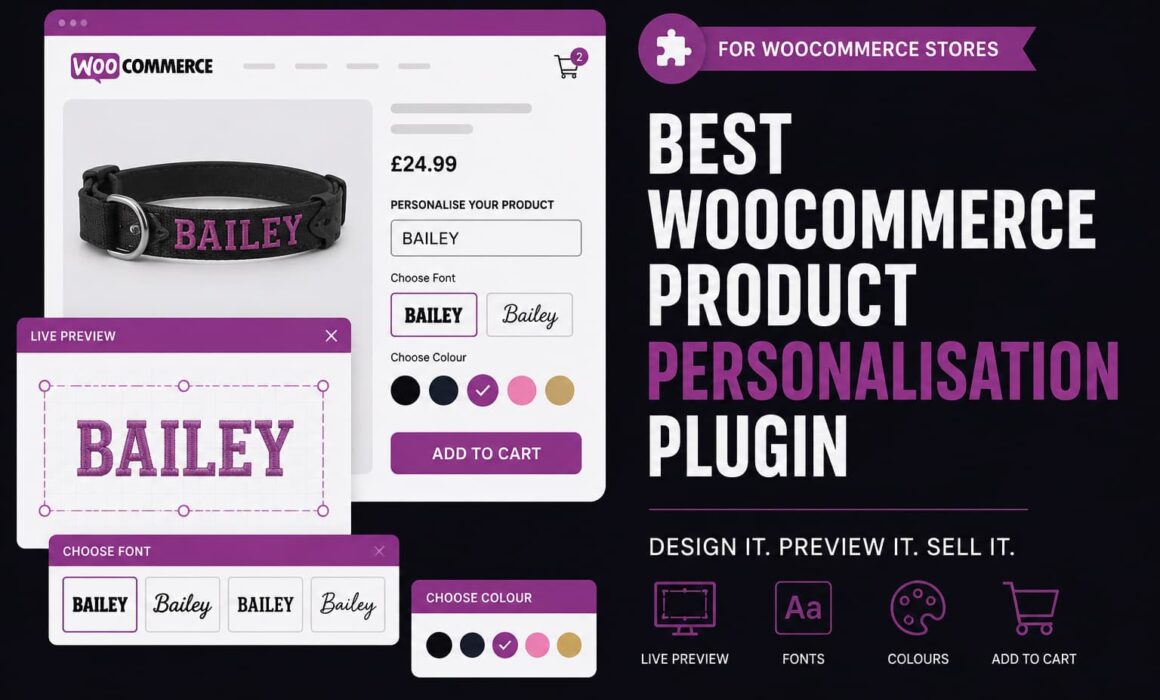
Best WooCommerce Product Personalisation Plugin for Custom Products
Choosing the right WooCommerce product personalisation plugin is not just about adding a name field to a product page. If you sell custom products, the real challenge is making sure customers can clearly personalise the item, understand what they are buying, and submit details your team can actually use in production.
That is where many WooCommerce stores hit problems. A basic product options plugin might let someone type text into a box, but it often does not give them a visual preview, line-specific styling, font controls, colour swatches, resize limits, or clean order data. For simple add-ons, that might be fine. For serious personalised products, it quickly becomes messy.
Why a WooCommerce product personalisation plugin needs to do more than collect text
Personalised products create a different type of ecommerce workflow. You are not just selling a stock item. You are collecting customer instructions, turning those instructions into a finished product, and trying to avoid mistakes before the order reaches production.
That means the plugin needs to support the full journey:
- the customer choosing personalisation options clearly
- the product page explaining what can and cannot be customised
- the customer seeing a preview before buying
- the cart and checkout carrying the right details
- the order screen showing clear production data
- the store team avoiding manual checks, emails and corrections
For WooCommerce stores selling engraved gifts, embroidered collars, printed clothing, labelled accessories, patches, plaques, bags, uniforms or made-to-order items, this matters commercially. A poor personalisation flow increases support queries, production errors, refunds, delays and customer frustration.
A proper WooCommerce product personalisation plugin should reduce that friction, not simply move it from the product page into your inbox.
Best WooCommerce product personalisation plugin features to look for
The best plugin is not always the one with the longest feature list. It is the one that handles the awkward details that appear once real customers start using it. Personalisation sounds simple until someone enters emojis, chooses a font that cannot be embroidered, makes one line tiny, forgets to personalise the product, or emails after ordering because they want to change the wording.
For custom product stores, the useful features are the ones that protect the customer journey and the production process at the same time.
Operator point: the best personalisation setup is not the one that lets customers do anything. It is the one that gives them enough choice while keeping the finished product realistic, readable and fulfilment-ready.
Live product previews
Live previews help customers understand what they are ordering before they add the product to their basket. That reduces uncertainty, especially on products where text placement, font choice, colour and size matter.
Without a preview, customers often hesitate. They might wonder whether the name will fit, whether the colour will look right, or whether the second line of text will be readable. That hesitation can turn into abandoned baskets or pre-sale support messages.
With Regal Product Personaliser, customers can personalise products inside a frontend design modal and see a visual canvas preview before purchase. For stores selling custom products, that can make the buying process feel more confident and professional.
Design templates
Design templates matter because different products need different rules. A dog collar, engraved tag, embroidered patch and printed hoodie should not all share the same layout controls.
A strong product personaliser lets the store define how each product should behave. That includes canvas size, background image, text position, desktop and mobile text size, available fonts, available colours, guidance text, required settings and pricing options.
Regal Product Personaliser uses Design Templates so stores can configure the customer experience around the actual product being sold. That is much cleaner than forcing every personalised product through the same generic text field setup.
Template Groups for scaling personalisation
Template Groups are useful when several products share common personalisation rules. For example, a store might sell several collar sizes that all use the same fonts, colours and basic layout, but still need small differences per product.
Instead of recreating every setting manually, shared settings can be managed through groups and inherited where appropriate. That reduces admin duplication and keeps product setup more consistent across the catalogue.
This becomes more important as the store grows. A small shop might manage five custom products manually. A larger catalogue with dozens or hundreds of customisable products needs structure.
Basic WooCommerce product options plugins vs Regal Product Personaliser
Many stores start with a basic product options plugin because it looks like the quickest way to add personalisation. That can work for simple checkboxes, dropdowns or engraving notes. The problem starts when the product needs visual control, customer confidence and accurate fulfilment data.
| Area | Basic WooCommerce Product Options Plugins | Regal Product Personaliser |
|---|---|---|
| Customer input | Usually text boxes, dropdowns or checkboxes. | Line-specific text controls, font choices, colour options and visual design handling. |
| Product preview | Often no live preview, or only limited preview support. | Frontend modal designer with live canvas preview. |
| Design control | Limited control over layout, size and production constraints. | Design Templates, Template Groups, canvas controls, fixed positioning and resize limits. |
| Fonts and colours | May use plain dropdown fields. | Global fonts, font thumbnails, colour swatches, pattern colours and display ordering. |
| Validation | Often basic required field checks. | Required personalisation handling plus controls for disallowed characters and emojis. |
| Cart editing | Customers may need to remove and restart the product. | Customers can edit personalisation from the cart where configured. |
| Order data | Can be hard to read or too generic for production teams. | Cleaner line-level data for fulfilment, including selected text, font and colour details. |
How live previews improve custom product conversion
Custom product pages ask customers to make decisions. They need to choose text, fonts, colours and sometimes layout options. The more decisions you ask them to make, the more confidence they need before clicking add to basket.
A live preview gives the customer a visual answer to the question they are already asking: “What will this actually look like?”
That matters because personalisation is usually harder to reverse than a normal product purchase. Customers know they are buying something made for them. If they are not confident, they may pause, email the store, or leave the site altogether.
With Regal Product Personaliser, the customer-facing designer gives shoppers a clearer way to interact with the product. They can see text appear on the design, choose from font thumbnails, select colours through swatches, and adjust their personalisation before committing.
Example: reducing “can I see a mockup?” messages
Imagine a store selling personalised dog collars. Without a preview, customers may email asking whether “ARCHIE” will fit, whether metallic gold thread looks good on black nylon, or whether two lines will be too cramped.
Those questions slow down the sale and create admin work before the order even exists.
With a preview-led personalisation flow, the customer can test the wording, font and colour themselves. The store still controls the available options, but the customer gets more confidence at the point of purchase.
Why text controls are critical for personalised products
Text personalisation is where a lot of custom product problems begin. Customers do not always understand production limits. They might enter too many characters, use emojis, add unusual symbols, or create a layout that looks acceptable on screen but fails when embroidered, printed or engraved.
That is why a proper product personaliser needs more than a blank input box.
Regal Product Personaliser includes line-specific text component settings, allowing stores to manage different lines of personalisation separately. This is useful when one product has a main name line and a smaller secondary line, or when each line needs different behaviour.
Line-specific min and max text sizing
Some personalised products need strict visual limits. For example, Line 1 on a collar may need to remain large enough to be readable, while Line 2 can be smaller because it contains a phone number or short message.
If both lines can be resized freely, the customer might create something that technically fits the screen but looks poor in production. Line-specific minimum and maximum text size rules help protect the finished result.
This is especially useful for products where readability, stitch quality, engraving clarity or print accuracy matters.
Disallowed characters and emoji blocking
Customers often type what they use in normal messages. That can include emojis, symbols, accented characters, decorative marks or pictographic characters. Some of those might not be supported by the chosen font, embroidery machine, engraving process or production workflow.
Blocking unsuitable characters at the point of entry prevents a support problem later. It also avoids the awkward situation where a customer has paid for a design that cannot be produced as submitted.
RPP includes controls for disallowed characters and emoji-style symbol blocking, helping stores keep personalisation practical rather than chaotic.
How Design Templates help stores control custom products
Every custom product has its own rules. A printed T-shirt may allow larger placement areas, while an engraved tag has a much smaller working space. An embroidered collar might need strict font sizes and fewer colour options. A patch might have a fixed centre position and limited text lines.
Design Templates let the store define those rules at product level. That means the customer experience can match the product instead of forcing the product to fit a generic form.
Useful template controls include:
- canvas width and height
- background image and background zoom
- desktop and mobile default text sizes
- default text positioning
- fixed-centre positioning
- available fonts and colours
- top guidance text and helper copy
- required personalisation settings
- personalisation pricing
This gives store owners more practical control. Customers still get a flexible designer, but they are designing inside boundaries that make sense for the product.
That is the difference between useful personalisation and open-ended chaos dressed up as customer choice.
How Global Assets make WooCommerce personalisation easier to manage
Fonts and colours are easy to ignore at the start. Then the catalogue grows, products multiply, and suddenly the store owner is updating the same options across multiple products.
Global Assets help centralise this. In Regal Product Personaliser, stores can manage fonts, standard colours and pattern colours from a dedicated area. Fonts can have preview thumbnails, colours can be displayed as swatches, and display ordering can help promote the most suitable options first.
That matters because the customer-facing designer is not just a technical tool. It is part of the buying experience. A clear font selector and a clean colour swatch interface feel more professional than a long plain dropdown full of names customers cannot visualise.
Example: prioritising production-friendly options
A store might know that black, gold and silver are the most popular or most reliable colours for a certain product range. With display ordering, those choices can be shown more prominently rather than buried alphabetically among less common options.
That is a small detail, but small interface details often shape buying behaviour.
Why cart editing matters for personalised WooCommerce products
Personalised products create a common customer behaviour: second-guessing. A customer adds the item to the cart, checks the wording, then realises they want to change the spelling, colour or font.
If the only option is to remove the item and start again, that creates friction. Some customers will do it. Others will abandon the cart, especially if they are on mobile.
Regal Product Personaliser supports cart editing, allowing customers to return to the personalisation modal and adjust their choices without rebuilding the whole order from scratch.
For stores, this helps reduce support messages like “Can you change the name on my order?” shortly after checkout. For customers, it creates a more forgiving buying journey.
How cleaner order data improves fulfilment
The sale is only half the job. Once a personalised order comes in, the production team needs to understand exactly what has been ordered.
Poor order data causes mistakes. If custom text is buried in generic metadata, repeated unnecessarily, missing line labels, or mixed with unused blank fields, production becomes slower and riskier.
Regal Product Personaliser is built to carry useful personalisation data through the WooCommerce flow, including cart, mini-cart and order details where appropriate. It can show line-specific information such as Line 1, Line 2, selected font and selected colour, while excluding empty unused lines.
That gives production teams cleaner information to work from. It also helps customer service staff check order details quickly if a customer contacts the store.
Production reality: a custom product designer is only useful if the submitted order data is clear enough for someone to make the product correctly. Pretty previews are not enough if the fulfilment notes are a mess.
Personalisation pricing and average order value
Product personalisation often adds labour, machine time, materials, handling and risk. It should not always be treated as a free extra.
A good WooCommerce personalisation setup should allow stores to charge for customisation clearly. That might be a flat personalisation fee, a paid upgrade, or an additional charge linked to the personalised option.
Regal Product Personaliser supports personalisation pricing and display options, including how prices appear on the product page, inside the designer and in the cart. That helps customers understand the cost before checkout rather than discovering it late in the journey.
Clear pricing matters for conversion. Hidden or confusing charges can damage trust. Properly displayed personalisation charges can increase average order value while still feeling fair to the customer.
Example: paid embroidery upgrade
A store selling collars might offer the plain product as standard, with embroidered name personalisation as a paid option. The customer can see the design, select the font and colour, and understand the added cost before adding the item to the basket.
That is cleaner than adding a separate upsell product, asking customers to leave notes, or manually invoicing them later.
Why mobile usability matters for product personalisation
A lot of ecommerce traffic now comes from mobile. That creates a problem for visual personalisation tools: what works on a desktop screen can feel cramped, fiddly or confusing on a phone.
Personalised product pages need mobile-aware controls. Customers should be able to open the designer, enter text, choose fonts, select colours and review the preview without fighting the interface.
Regal Product Personaliser includes mobile-aware handling, including separate desktop and mobile text sizing controls. That helps store owners create a designer experience that feels usable across devices rather than simply shrinking a desktop layout.
This is important because personalisation often requires more interaction than a normal product page. Any extra friction on mobile can quickly turn into abandoned baskets.
How analytics help stores improve personalised products
Once a store starts selling custom products, it becomes useful to know what customers are actually choosing. Which products are being personalised most often? Which colours are popular? Are pattern colours being selected? Which variations are performing?
Regal Product Personaliser includes dashboard analytics for personalised product performance, variation-level product labels, daily choice trends, colour analytics and pattern colour analytics.
This matters because personalisation data can influence stock planning, product photography, marketing, merchandising and production decisions.
For example, if gold text is consistently the most popular option on a certain product, the store may decide to feature that combination more prominently in ads, product images or social content. If a certain personalised variation underperforms, the store can review whether the preview, price or product positioning needs work.
When a basic plugin is enough and when it is not
A basic WooCommerce product options plugin can be enough for simple use cases. If you only need a single gift message field or a checkbox for “add wrapping”, a full visual personalisation system may be more than you need.
But if your store sells products where the customer needs to design, preview, style or approve the personalisation before buying, a basic plugin usually becomes limiting.
You should consider a dedicated product personaliser if you need:
- live product previews
- font and colour selection
- line-specific text controls
- text size boundaries
- template-based product layouts
- shared settings across product groups
- clean production data in orders
- cart editing for personalised items
- required personalisation validation
- pricing for personalised upgrades
For stores that rely on custom products as a serious revenue stream, those features are not just nice extras. They are the difference between a smooth workflow and a pile of manual fixes.
Why Regal Product Personaliser is built for serious WooCommerce custom product stores
Regal Product Personaliser is not trying to be a generic options field plugin. It is built around the real workflow of selling personalised products in WooCommerce: setting up controlled designs, giving customers a visual preview, charging properly, collecting usable details, and helping the team fulfil the order accurately.
That makes it particularly useful for stores selling embroidered products, engraved items, printed goods, patches, pet accessories, labels, gifts, apparel and made-to-order products where the customer’s input directly affects the finished item.
It gives store owners a more structured way to manage personalisation without losing commercial control. Customers get a better buying experience, production teams get clearer order data, and the store reduces the amount of manual chasing that usually comes with custom products.
If your WooCommerce store has outgrown plain text fields, unclear order notes or basic add-on plugins, Regal Product Personaliser gives you a more practical way to sell custom products properly.
Build a personalisation flow that customers trust and your team can fulfil
The best custom product experience is not complicated. It is controlled, clear and confidence-building. Customers should know what they can personalise, see what they are creating, understand any extra cost, and complete the order without needing to email for reassurance.
Your team should then receive the order with the right details in the right place, without having to decode messy notes or guess what the customer intended.
That is the practical value of choosing the right WooCommerce product personalisation plugin. It helps the store sell custom products in a way that protects conversion, reduces mistakes and keeps production moving. For WooCommerce stores that want a more serious setup, Regal Product Personaliser is built for exactly that job.